
Multan Bill Check Online
Need to check your Multan bill online? Use the bill checker below to view your latest MEPCO bill using your Reference number and Consumer ID. You can check important billing information such as the payable amount, due date, and other details without waiting for a paper copy.
Your reference number and connection type (U/R) are printed together at the top of any previous MEPCO bill.
Independent lookup tool · not affiliated with
MEPCO, PITC, or WAPDA.
Official portal: bill.pitc.com.pk
How to check the Multan bill online
Checking your Multan Bill is very simple. Follow these steps to get your bill details in a few minutes.
01
Find your reference number or Consumer ID
Look at a previous MEPCO bill and locate the reference number printed on it.
02
Enter the number
Enter the reference number into the Multan bill checker above. Make sure the digits are entered correctly.
03
Check your bill
Select the check option to retrieve the available billing information.
03
Review & Save
Check the amount payable, due date, and other information shown on the bill. Download or print if needed.
Multan MEPCO Bill
Multan is part of the service area of the Multan Electric Power Company (MEPCO). If your electricity connection is billed by MEPCO, your monthly bill contains information that can be used to identify and check your account.
Where to find the reference number OR Consumer ID
Your reference number can be found on a previous MEPCO bill. It is important to enter the number exactly as it appears on the bill. A single incorrect digit can prevent the system from finding the correct billing record. If you regularly check your bill online, it is useful to keep your reference number somewhere safe so you do not have to search for an old paper bill every month.
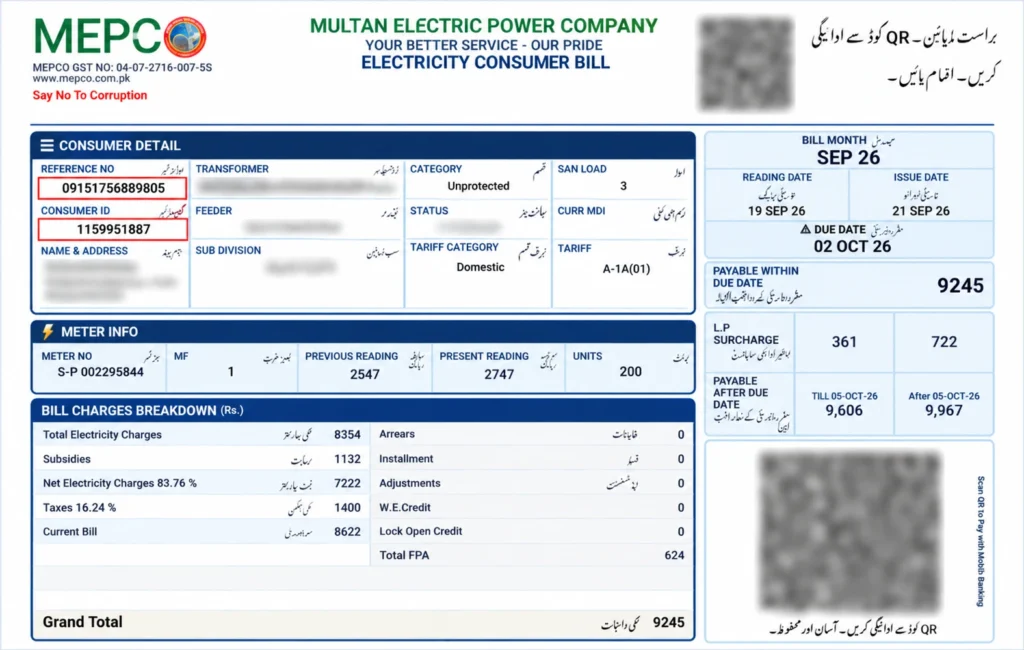
What Is a MEPCO Reference Number?
The reference number is an identifier associated with your electricity connection and is used to retrieve the corresponding billing record. It is different from other information printed on your bill, such as the meter number, customer details, or billing amount. Always use the number requested by the bill-checking system.
What Information Can You See on a Multan Bill?
The exact information displayed can vary depending on the billing record and the system providing the bill. A typical MEPCO bill may contain information such as:
- Consumer ID
- Reference number
- Billing month
- Meter reading information
- Units consumed
- Current bill amount
- Previous balance or arrears, where applicable
- Due date
- Taxes and other applicable charges
- Payment-related information
Review these details carefully, especially the amount payable and due date, before making a payment.
How to get Multan Duplicate Bill
If your paper bill has not arrived, has been misplaced, or you simply need another copy, you can use the online service to access the available bill information. A Multan duplicate bill can be useful when you need a copy for payment, record-keeping, printing, or other administrative purposes. Use your reference number or ypur consumer ID to check the bill first. Once the bill is available, use the available print or download option if provided.