MEPCO Bill Check Online — November 2026
Enter your 14-digit reference number or 10-digit customer ID below to view your MEPCO electricity bill instantly. See your due date, payable amount, and units consumed in seconds — no login, no registration, and no app download required.
Your reference number and connection type (U/R) are printed together at the top of any previous MEPCO bill.
Independent lookup tool · not affiliated with
MEPCO, PITC, or WAPDA.
Official portal: bill.pitc.com.pk
What is MEPCO?
MEPCO (Multan Electric Power Company) is one of Pakistan's ex-WAPDA electricity distribution companies, supplying power to 13 districts across southern Punjab. It operates under NEPRA's(National Electric Power Regulatory Authority) regulatory oversight for tariffs, and shares its billing and complaint infrastructure (PITC(Power Information Technology Company in Pakistan), CCMS(Component Content Management System)) with other Punjab distribution companies like LESCO(Lahore Electric Supply Company) and FESCO(Faisalabad Electric Supply Company).
Built for trust, not just speed
Instant, Accurate Results
Pulled from the same official PITC billing records used by the MEPCO portal itself.
No Login, No Registration
Just your reference number or customer ID — nothing else to remember.
Works on Any Device
Phone, tablet, or desktop browser — no app download needed.
Independent & Transparent
We say plainly what we are: an independent tool, not an official MEPCO channel.
How to check MEPCO bill online
In under a minute, using either your reference number or consumer ID, you can check your bill online. First of all, you have to open your browser and search for our official website to check your MEPCO Bill online. After that, here are three steps to find your bill online.
01
Find your reference number or Consumer ID
Look at the top-left of any previous MEPCO bill. The 14-digit reference number ends in U (Urban) or R (Rural); the 10-digit consumer ID is printed just below it.
02
Enter it and select Urban or Rural
Type the number above and choose the connection type matching your reference number. Wrong U/R selection is the most common reason a bill fails to load.
03
View, download, or print your bill
Your complete bill appears instantly — download as PDF or print, both accepted for payment at banks, EasyPaisa, JazzCash, and MEPCO offices.
In case you don't know where to find the Reference number or your consumer ID, you can see the image:
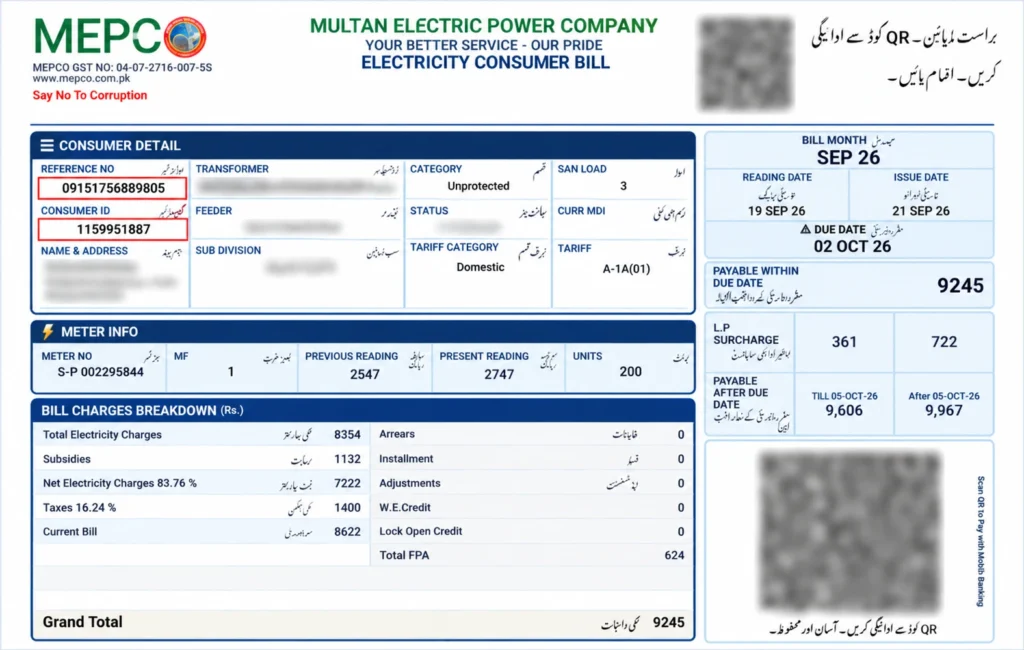
Don't have a previous bill? Or want to check MEPCO previous bill: Retrieve your reference number or customer ID from MEPCO's online portal (verify with your name, CNIC, and address), or visit your nearest MEPCO customer service center.
Understanding your MEPCO bill
A MEPCO bill is more than one total — here's what every line means.
Due Date
The last date to pay at the standard rate before a Late Payment Surcharge applies.
Payable Amount (Within Due Date)
Your total owed if paid on or before the due date — usage charges plus taxes and surcharges.
Payable After Due Date
The higher amount owed after the due date, already including the Late Payment Surcharge (LPS).
Units Consumed
Total electricity used this billing month, measured in kWh — the figure your tariff rate applies to.
Meter Reading
Current and previous readings; the difference between them determines units consumed.
FPA (Fuel Price Adjustment)
Reflects changes in fuel cost for generation — rises or falls your bill as fuel prices move.
TR Surcharge
Tariff Rationalization Surcharge, set by NEPRA to balance costs across distribution companies nationally.
Deferred Amount
A balance carried from a previous cycle — an approved installment or unresolved adjustment.
QTR Tariff Adjustment
A quarterly correction reflecting updated fuel and generation costs, reassessed by NEPRA every 3 months.
Protected, Unprotected & Lifeline Status
This is the detail most bill-checking sites get wrong: for most households, your bill is not calculated the way income tax brackets work.
| STATUS | WHO QUALIFIES | HOW IT'S BILLED |
|---|---|---|
| Unprotected (default) |
Any residential consumer not meeting the protected or lifeline criteria below | Entire month's units charged at the rate of the highest band reached — not blended across bands |
| Protected | Non-Time-of-Use connection, sanctioned load under 5 kW, usage at or under 200 units/month consistently for the past 6 months | Gets the benefit of the previous slab — first 100 units at the lower rate, only units 101–200 at the next rate |
| Lifeline | Single-phase connection, sanctioned load of 1 kW or less, usage at or under 100 units (highest of last 12 months or current month) | No slab benefit — whole month billed at whichever of the two lifeline rates it falls into |
A household using very little electricity can still be barred from protected status if its sanctioned load is 5 kW or higher, since that load requires Time-of-Use metering regardless of actual usage. Your status is printed on your bill near your tariff code — see the Bill Calculator for a worked estimate under each status.
Peak Hours vs. Off-Peak Hours
Electricity costs more to supply during peak hours. Shifting high-load appliances outside these windows is the simplest way to reduce your bill. Here are the Peak and off-Peak hours:
A household using very little electricity can still be barred from protected status if its sanctioned load is 5 kW or higher, since that load requires Time-of-Use metering regardless of actual usage. Your status is printed on your bill near your tariff code — see the Bill Calculator for a worked estimate under each status.
Beyond checking your bill Online
A detail most guides get wrong: for most households, your bill is not calculated the way income tax brackets work.
Bill Calculator
You can check your electricity bill units by using our latest Bill Calculator. By using this calculator, you can estimate your bill units, see how many units you have used in the current month, and compare those units with the previous month to save your units. As officially announced that if someone's units are above 200 units in a month then he will pay more than others who didn't go above the 200, as an unprotected consumer. So,
Bill History
You can also check your previous month's bill, for example, if you want to check your September bill or any previous month. For checking previous month bill just click Check History.
Helpline & regional numbers
For complaints (overbilling, outages, voltage issues), use the shared PITC complaint system: register or track a complaint →
Quick answers
Yes. Looking up your MEPCO bill costs nothing, requires no account, and has no hidden charges.
No. MEPCO bill lookups require a 14-digit reference number or 10-digit customer ID. CNIC alone isn't accepted for online bill checking.
Usually an incorrect Urban/Rural selection, a typo in the reference number, or a very new connection whose first bill isn't generated yet (1–2 months). Try your customer ID instead, or visit your nearest MEPCO subdivision office.
U stands for Urban and R stands for Rural — whether your connection is registered in a city or rural area. It's printed at the end of your 14-digit reference number.
No. This is an independent tool showing the same data available on MEPCO's official portal. For account changes or complaints, use mepco.com.pk directly.
Yes, MEPCO offers installment plans scaled to the bill amount — typically 3 installments for bills around Rs 10,000, 4 installments for bills around Rs 5 lac, and up to 12 installments for bills around Rs 10 lac. Apply through your local MEPCO subdivision office; exact eligibility and terms are set case by case.
Yes, due date extensions can be requested at your MEPCO subdivision office, generally for genuine hardship or delayed bill delivery. This isn't automatic — you need to request it before the due date passes to avoid a Late Payment Surcharge.
Yes. Once loaded, download your bill as a PDF or print it — both accepted as valid duplicate copies at banks, EasyPaisa, JazzCash, and MEPCO offices.
Visit your MEPCO subdivision office with your bill and supporting evidence — a photo of your actual meter reading, for example. Bill correction requests (wrong reading, estimated units, wrong tariff category) are reviewed and handled at the subdivision level, not online.
Report a faulty, damaged, or suspiciously fast-running meter to your MEPCO subdivision office, or through the CCMS Contact Centre at 118. A technical team inspects the meter before approving replacement — consumers aren't permitted to replace or modify a meter themselves.
Yes. Apply through the ENC portal (enc.com.pk) under "Change of Name," attaching your attested CNIC, a copy of your electricity bill, and proof of ownership or tenancy. After online submission, print the form and submit hard copies to your subdivision office, pay the demand notice issued, and the name updates after verification.
MEPCO coverage areas
MEPCO supplies electricity across 13 districts of southern Punjab.